01
Bestaat er een gratis spraakrekenmachine die ik online kan gebruiken zonder app?
Ja. voicecalculator.app opent een gratis spraakrekenmachine in je browser: tik op de microfoon, spreek een som uit als „twintig procent van tachtig” en het antwoord staat er meteen. Geen account, geen installatie, geen tijdslimiet. Uitgesproken hoofdrekenen, procenten, machten en wortels blijven gratis, op Android, Windows, Mac of iPhone.
02
Hoe gebruik ik de spraakrekenmachine?
Open voicecalculator.app of de iOS-app, tik op de microfoon en zeg de som zoals je hem tegen iemand zou zeggen: „twintig procent van tachtig”, „1250 ÷ 4 + 18”. Je hoeft geen operatoren of syntaxis te leren. De herkende tekst staat boven het antwoord, dus je ziet wat er verstaan is. In een stille ruimte kun je ook typen.
03
Is de spraakrekenmachine gratis, of is er een abonnement?
De spraakrekenmachine op het web is voor altijd gratis, en de iOS-app is een gratis download met het basisrekenen op spraak erbij. Alleen de AI-functies — verhaaltjessommen, algemene vragen, redeneren in meerdere stappen — vragen om een ontgrendeling, en dat is een eenmalige aankoop van $7,99. Geen abonnement, geen maandbedrag, geen advertenties, geen terugkerende kosten.
04
Kan ik een som inspreken in plaats van de getallen te typen?
Dat is precies het idee. De spraakrekenmachine gebruikt spraak als invoermethode: de spraakherkenning van je apparaat maakt van wat je zegt een uitdrukking, en de rekenmachine lost die op. Decimalen, procenten, machten en wortels gaan gewoon hardop. De herkende tekst staat boven het antwoord, dus als een getal verkeerd binnenkwam, zie je het en typ je die regel opnieuw.
05
Is dit een sprekende rekenmachine — leest hij het antwoord voor?
Op het web wel. Zet bovenaan de rekenmachine „Antwoorden hardop voorlezen” aan en elk resultaat wordt in jouw taal uitgesproken met de spraaksynthese van je browser. De iOS-app toont antwoord en tussenstappen op het scherm en laat ze voorlezen door VoiceOver of „Spreek scherm uit”. Allebei accepteren ook getypte invoer.
06
Lost hij ook verhaaltjessommen op, niet alleen kale getallen?
Ja — daar is de AI in de iOS-app voor. Vraag „verdeel een rekening van $85 over 4 personen met 15% fooi” of „wat is voordeliger: 10 stuks voor $3.99 of 12 voor $4.99?” en hij laat de stappen zien, niet alleen het eindgetal. De rekenmachine in de browser doet alleen directe sommen en zegt het wanneer een vraag de app nodig heeft.
07
Werkt het handsfree tijdens het koken of winkelen?
Ja. Een spraakgestuurde rekenmachine bewijst zich juist als je handen bezet zijn: ingrediënten afwegen, een rolmaat vasthouden, schapprijzen vergelijken. Eén tik op de microfoon, je spreekt, het antwoord staat er. In de browser blijven de laatste resultaten eronder staan, zodat je een totaal kunt controleren zonder opnieuw te beginnen.
08
Welke talen verstaat de spraakrekenmachine?
De site en de rekenmachine in de browser zijn er in 19 talen: Nederlands, Engels, Spaans, Portugees, Frans, Duits, Italiaans, Russisch, Oekraïens, Pools, Arabisch, Hindi, Bengaals, Japans, Koreaans, Indonesisch, Filipijns en Chinees in vereenvoudigde en traditionele vorm. Uitgesproken getallen worden in de meeste ervan herkend; in het Pools en Oekraïens voorlopig alleen cijfers en symbolen. De iOS-app volgt de spraakherkenningstaal van je iPhone.
09
Waarin verschilt dit van iets aan Google of Siri vragen?
Google en Siri doen eenvoudige sommen prima. Een aparte spraakrekenmachine wint bij alledaags rekenwerk in meerdere stappen — korting plus btw, een prijs-per-eenheidvergelijking, een gedeelde rekening met fooi — als je de tussenstappen wilt zien en niet alleen een getal wilt horen. Eén scherm: microfoon, antwoord, de laatste sommen. Geen pagina met zoekresultaten om door te spitten.
10
Waarom is microfoontoegang nodig, en welke browsers werken?
Spraakinvoer gebruikt de spraakherkenning van je eigen browser, dus de pagina vraagt één keer toestemming voor de microfoon — wij nemen niets op en sturen niets door. Spraak werkt in Chrome, Edge en Safari; het tekstveld werkt in elke browser. Doet de microfoonknop niets, controleer dan de sitetoestemming in de adresbalk.
11
Wat kan de AI-spraakrekenmachine dat een gewone rekenmachine niet kan?
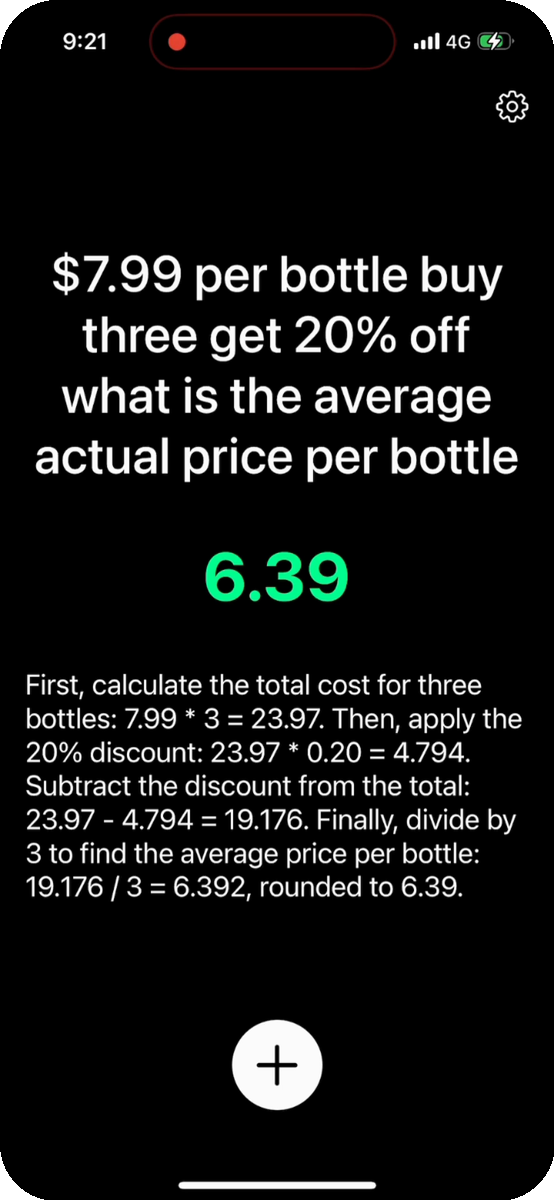
Hij begrijpt de vraag, niet alleen de toetsaanslagen. De AI-spraakrekenmachine in de iOS-app leest alledaagse formuleringen — „hoe laat is het in Tokio als het in New York 4:16 PM is”, „reken 72°F om naar Celsius”, „$7.99 per fles, drie met 20% korting, wat kost er dan één?” — en antwoordt met de stappen.
12
Is er een spraakrekenmachine voor Android of desktop?
De gratis spraakrekenmachine in de browser werkt op Android, Windows, Mac en ChromeOS — open voicecalculator.app, installeren hoeft niet. De AI-app die verhaaltjessommen oplost is alleen voor iPhone en iPad, iOS 16 of nieuwer; er is geen Android- of Windows-versie. Voor eenvoudig hardop rekenen op elk apparaat is de webversie het antwoord.
13
Zijn mijn spraakgegevens privé?
De spraakherkenning gebeurt door je eigen apparaat en browser, dus je audio gaat nooit naar ons. Bij de AI-functies gaat alleen de getranscribeerde tekst van je vraag — nooit de opname — naar het taalmodel dat hem oplost, en daar wordt hij niet permanent bewaard. Wij bewaren geen enkel gegeven van je op onze servers.
14
Werkt de spraakrekenmachine zonder internet?
Gedeeltelijk, en dat zeggen we liever dan te veel te beloven. Getypt rekenen blijft werken zodra de pagina geladen is, maar de AI-functies hebben verbinding nodig omdat een taalmodel de vraag uitlegt, en de spraakherkenning van je browser leunt op zijn spraakdienst. Moet het gegarandeerd offline, neem dan de ingebouwde rekenmachine.
15
Is het geschikt voor kinderen, dyslexie of slechtzienden?
Veel mensen gebruiken een spraakrekenmachine omdat praten makkelijker is dan typen: leerlingen met dyslexie of dyscalculie, kinderen die het cijferblok nog leren, en iedereen voor wie kleine knopjes lastig zijn door handen of ogen. Zet „Antwoorden hardop voorlezen” aan en het resultaat wordt ook uitgesproken. Geen registratie, niets in te stellen, en de webversie is gratis.
16
Kan hij procenten, fooi en prijsvergelijkingen?
Procenten ja, gewoon in de browser: zeg „twintig procent van tachtig” en het getal staat er meteen, net als optellen, aftrekken, vermenigvuldigen, delen, machten en wortels. Kortingen, fooien en prijs-per-eenheidvergelijkingen — „20% korting op $129.99”, „10 voor $3.99 of 12 voor $4.99?” — zijn verhaaltjessommen, en daar is de AI in de iOS-app voor.
17
Can I try it without the app?
Yes — the Gratis Online Spraakrekenmachine runs in your browser, with no download and no sign-up.
 VoiceCalc